
The operations workspace for AWS and Kubernetes
From alert to safe fix,
in one workspace.
SSH, SFTP, S3, EC2 and Kubernetes for AWS engineers. Local-first, no account, built for production.
Free plan · No account · 30-day Pro trial on every device
Version 0.7.1 · Linux .deb · macOS and Windows on the waitlist
- Local-firstNo cloud backend between you and your systems.
- No accountDownload it and use it.
- No telemetryNo analytics, no crash reports.
- Credentials in your OS keyringNever in plain files.
The problem
It’s 2 a.m. Memory alerts on staging.
You open the AWS console, a terminal, k9s, an SFTP client and a notes file. You copy a pod name from one window to the next and hope you are still on the right cluster.
UltraPlus Ops puts the whole investigation in one window.
How it works
Investigate. Understand. Act safely.
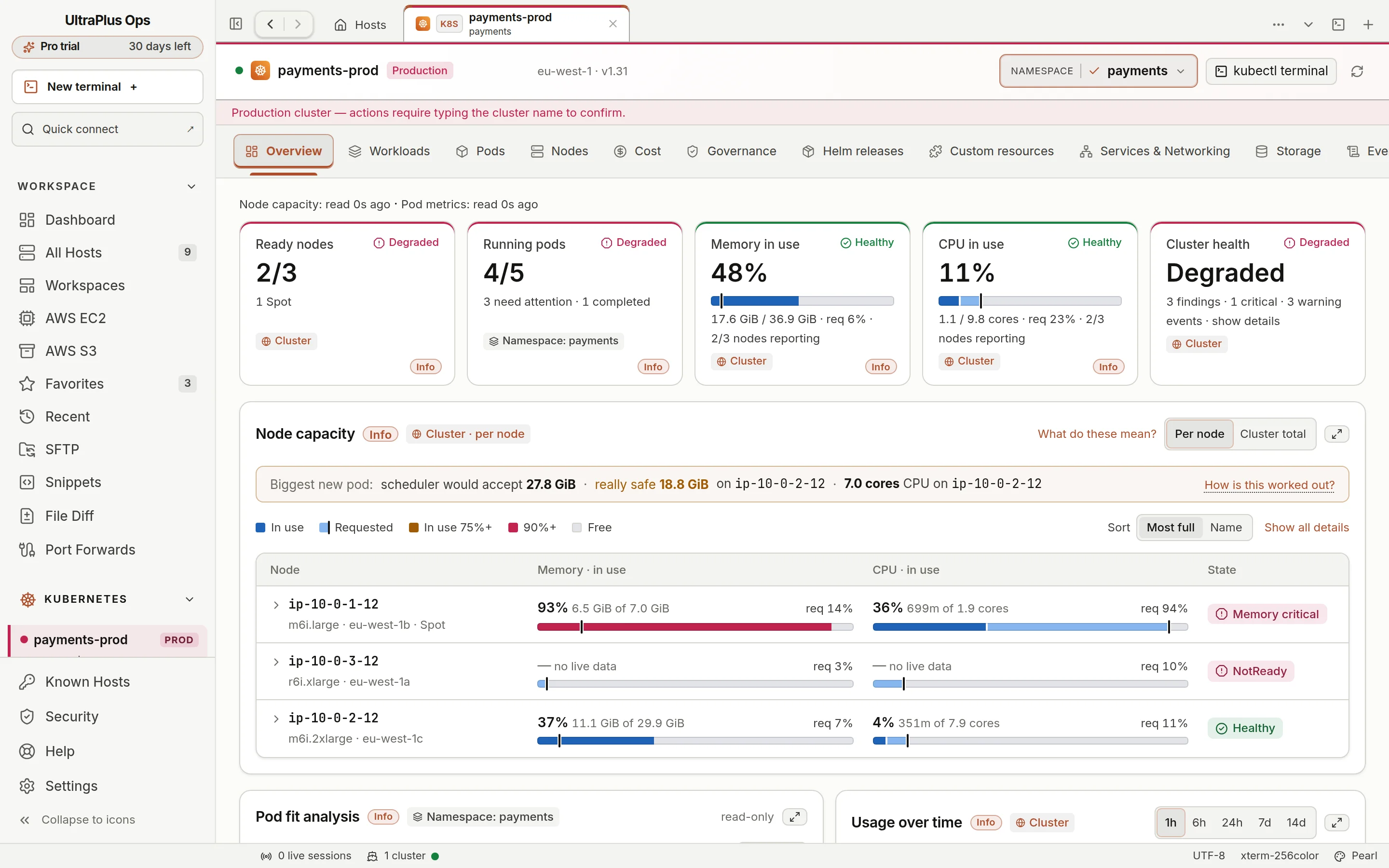
Three steps, one window, the cluster and namespace always in view. The real app with demo data, at real speed.
Investigate
Open the cluster and its Overview sorts nodes most full first, with memory and CPU in use shown next to what pods requested.
Understand
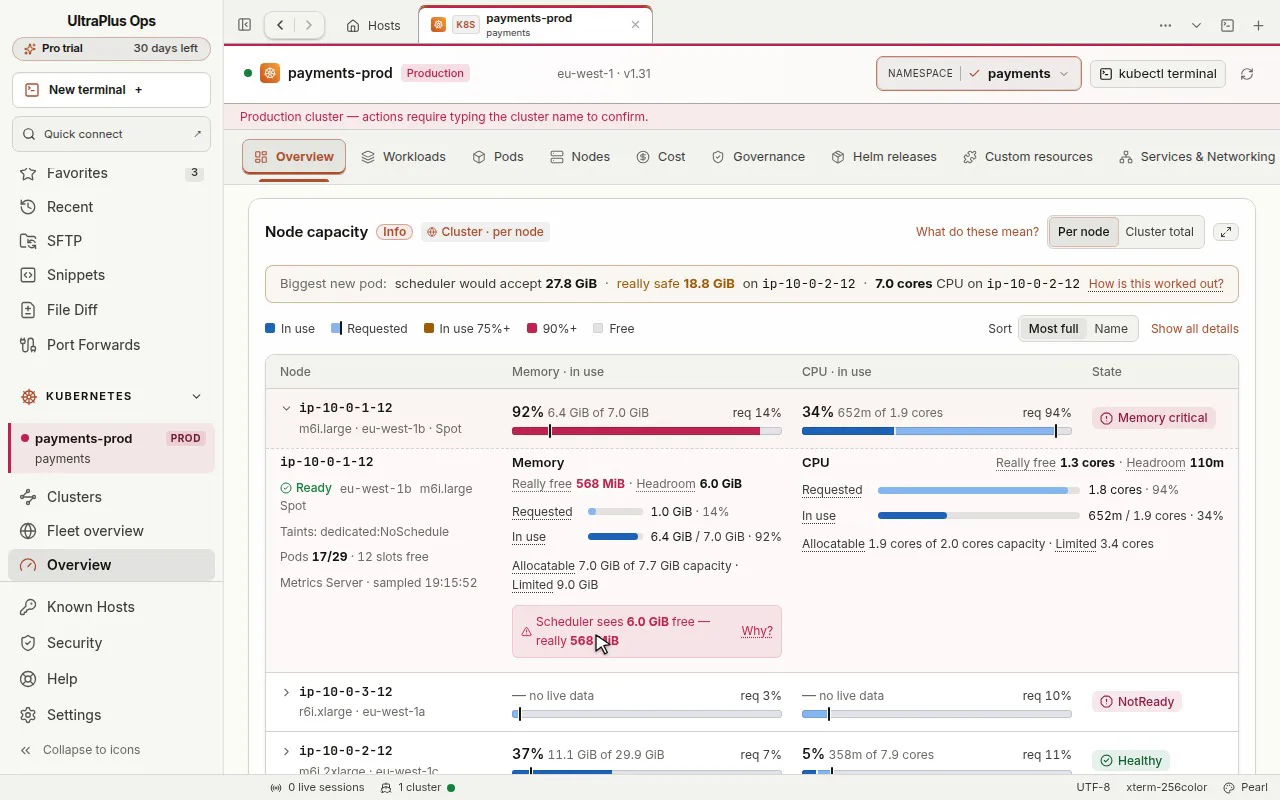
Top memory users lists the pods behind the pressure, each with its request, limit and a state in words, so it never depends on colour alone.
Act safely
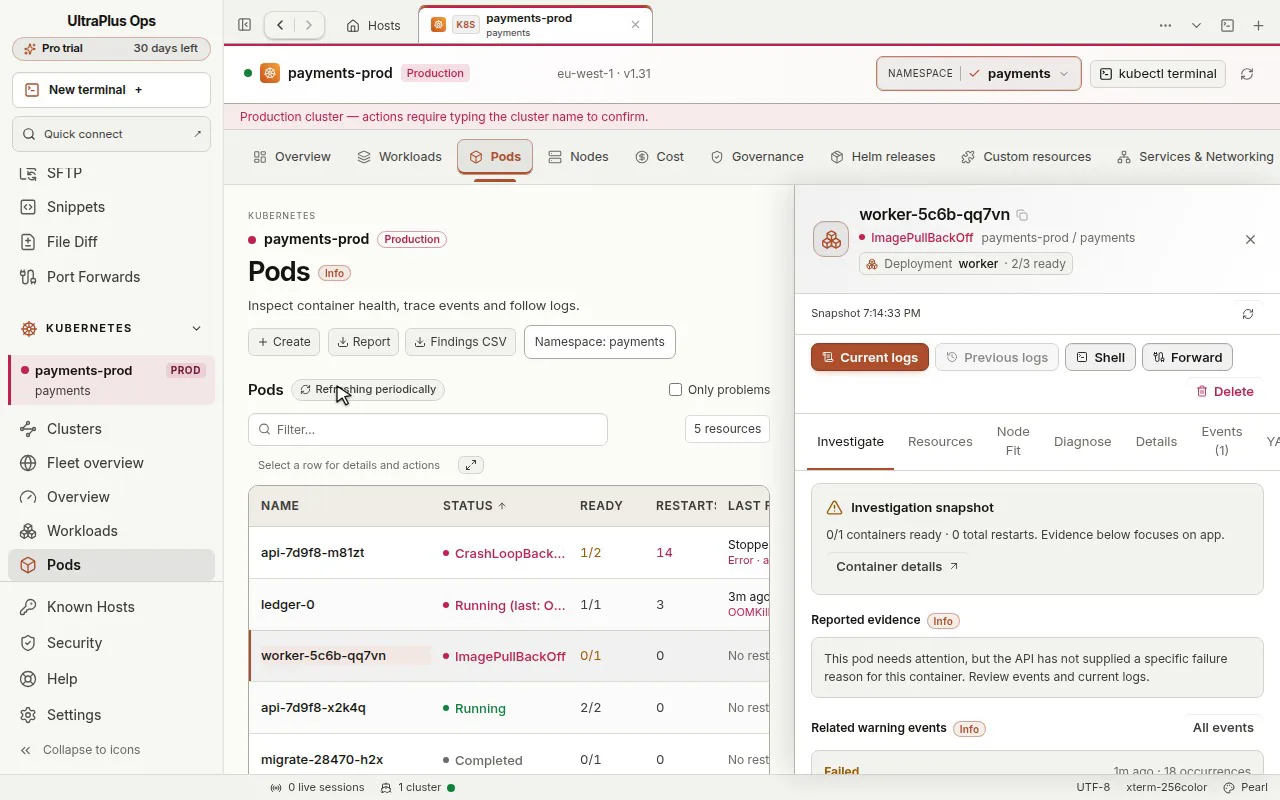
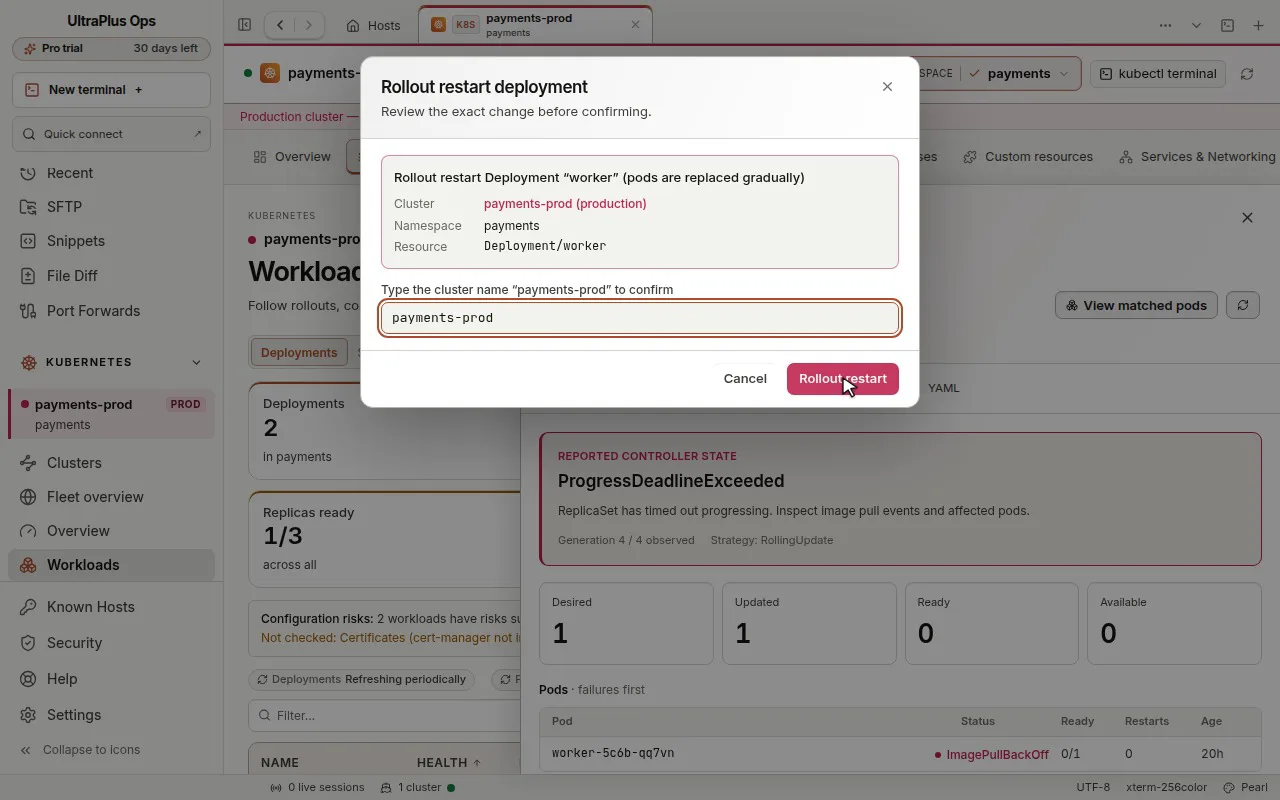
A rollout restart or scale names the exact cluster, namespace and resource. On a production cluster you type the cluster name before it runs.
What’s inside
Five tools’ worth of work, one app.
Everything listed here ships in version 0.7.1 today.
Kubernetes
- EKS discovery through AWS SSO or access keys, plus kubeconfig import.
- Workloads, pods, logs, exec, events, nodes, YAML and Helm.
- Node capacity, top memory users and pod fit analysis.
SSH and SFTP
- Split terminals, snippets, port forwards and focus mode.
- SFTP beside the terminal of the same server.
- Host keys always verified; a changed key is refused.
AWS
- EC2 inventory per profile and region, with SSM sessions.
- S3 browsing and transfers, including sending from a server.
- Your own profiles, SSO sign-in and IAM permissions.
Safety
- Production clusters are marked and ask for the typed cluster name.
- Cluster changes name their target and wait for your confirmation.
- File Diff runs on your machine: no content uploaded.
Security, briefly
Your credentials never leave your machine for ours.
Connections go straight from your computer to your servers, clusters and AWS. Passwords and tokens live in your operating system’s keyring. We run no service that sees your infrastructure.
Read every data flowHost keys always checked
A server whose key changed is refused, never silently trusted.
Your IAM and RBAC decide
The app never grants more than your own AWS and Kubernetes permissions allow.
Secrets masked in history
Values that look like secrets are masked before command history is saved.
Built for an 8-hour day
Calm enough to keep open all day.
Light and dark themes
Calm palettes where colour means status, and status never relies on colour alone.
Keyboard first
Quick connect and a command palette reach any host or cluster without the mouse.
Focus mode
Hide everything but the terminals when you need the whole screen.
Before and after
Fewer windows. Fewer mistakes.
| Before | With UltraPlus Ops |
|---|---|
| Five tools and a dozen tabs | One window |
| Copying pod names between windows | Click from node to pod to logs |
| “Which context am I in?” | Cluster and namespace always shown; production marked |
| A restart typed into the wrong terminal | The target named, then typed confirmation on production |
Questions
Plain answers.
Does it send my data anywhere?
No. There is no account, no telemetry, no analytics and no crash reporting. The app talks only to the servers, clusters and AWS services you connect to, directly from your computer. Nothing about your infrastructure goes to us or to any AI service. The security page lists every data flow.
I already use Datadog, Prometheus or Grafana. Do I need this?
Keep them. Monitoring tools watch your systems around the clock and tell you that something is wrong. UltraPlus Ops is where you then investigate and act: open the cluster, find the pod, read its logs, SSH to the node and restart it safely, in one app on your laptop. It installs nothing in your cluster; it reads it through the Kubernetes API with your own permissions.
Does it work without AWS?
Yes. SSH, SFTP, local terminals, port forwards, snippets, File Diff and any Kubernetes cluster in your kubeconfig work without an AWS account.
What about macOS and Windows?
Linux comes first, as a .deb package. Windows is in progress and macOS is planned. The waitlist page explains how we will announce them; no dates are promised.
Is it free?
The free plan covers SSH, SFTP, terminals, port forwards, snippets, S3 from your computer, EKS discovery, File Diff and one Kubernetes cluster at a time. Every device also gets a 30-day trial of Pro, which adds the rest, starting with any number of clusters. Pro prices will be published when paid plans open.
Can I use it at work?
Yes. The licence agreement covers work for your employer or clients. It uses your own credentials and permissions; check your organisation’s policy on desktop tools.
How do updates work?
There is no automatic updater yet. Download the new .deb from the download page and install it over the old one; your hosts and settings are kept. Each release lists its changes and its SHA-256 checksum.
Get started
Try it on your next incident.
Version 0.7.1 for Linux, free plan, no account. Check the SHA-256 before you install.